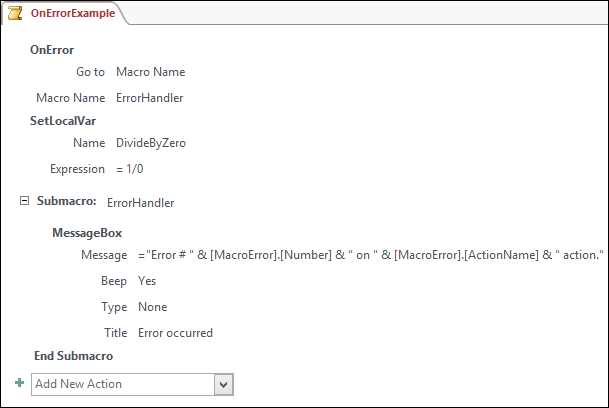
The Submacro statement in Access defines a separate macro in the Macro Designer window.
Setting
The Submacro action has only one required argument.
| Action argument | Description |
|---|---|
Name |
A string that appears as the name of the macro. |
Remarks
You can use the Submacro statement to define separate sets of actions. You can run the actions that are defined in submacros from another macro by using the RunMacro action. In the Macro Name argument of the RunMacro action, use the following syntax to run the submacro:
<macro name>.<submacro name>
You can also use the Submacro statement to define a set of error-handling actions within a macro.
Example
The following macro demonstrates the Submacro statement together with an OnError macro action. In this example, the OnError action tells Access to run a custom error-handling submacro named ErrorHandler when an error occurs. If an error occurs in any of the actions that follow, Access jumps to the ErrorHandler submacro. The ErrorHandler submacro displays a message box that refers to the MacroError object to show information about the error.
This screenshot shows the previous example in the Access macro designer. In this case, the expression in the SetLocalVar action triggers an error because it tries to divide a number by zero. Access moves to the submacro named ErrorHandler and displays the error information in a message box.