
Last Updated: June 29, 2026
This article describes a known issue affecting Microsoft 365 mobile apps on iOS and iPadOS devices that are managed with Microsoft Intune app protection policies, also known as mobile application management (MAM). After recent app updates, some users may experience unexpected account removal and repeated sign-in prompts during app launch or onboarding. This article outlines the symptoms, possible causes, and actions to gather diagnostic information for investigation.
ISSUE
On iOS or iPadOS devices managed with Intune app protection policies, Microsoft 365 mobile apps such as Word, Excel, PowerPoint, or OneNote may exhibit inconsistent application states after launch. The issue can occur intermittently and is not always linked to tenant configuration changes. Observed symptoms include:
The app incorrectly detects a sign-out condition, triggering account removal.
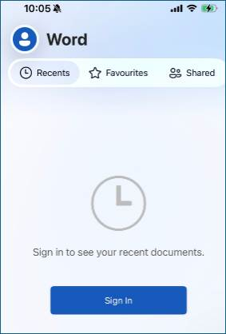
Forced re-authentication and re-initialization of app protection policies.
Repeated sign-in prompts despite prior enrollment.
Unexpected licensing or trial prompts during app onboarding.

Errors during OneNote setup.
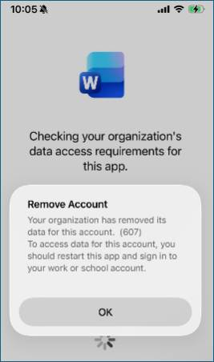
Example error messages include:
"Your organization has removed its data from this account. (607)"
"An error has occurred" (during OneNote setup).
The behavior can occur across multiple apps on the same device and may repeat without recent updates or configuration changes.
Environmental Details
Platform: iOS / iPadOS
Apps: Word, Excel, PowerPoint, OneNote
Management: Intune MAM (App Protection Policies)
Versions observed:
Word / Excel / PowerPoint: 2.111.x
OneNote: 16.111.x
Repro Steps
Launch a Microsoft 365 app on an Intune-managed iOS device.
During app startup, account validation completes.
App may incorrectly detect a signed-out state.
App removes organizational data and prompts sign-in.
Cause
A timing condition during app startup may cause the app protection component to check account status before sign-in completes. This can result in the app incorrectly treating the account as signed out and triggering a data removal (selective wipe) event.
STATUS: FIXED
Updates have been released to improve app startup behavior and reduce unexpected sign-outs.
Fix Details
Apps now wait for sign-in completion before applying app protection checks, preventing false sign-out detection.
Improvements reduce startup timing gaps that could trigger unintended data removal.
Enhancements ensure more consistent behavior across app restarts.
Fix Availability
Included in latest Microsoft 365 app updates via the App Store.
Rollout is in progress across Word, Excel, PowerPoint, and OneNote.
Next Steps
- Update all Microsoft 365 apps to the latest App Store version, then sign out and sign back in, and retest after restarting the app/device.
Collect diagnostic information
- Capture a Send-a-Frown submission after repro, note the Session ID, and record app version, device details, and screenshots.
For steps, go to How to give feedback in Microsoft 365.
Additional Notes
This behavior is not typically caused by admin-initiated wipes.
Access is usually restored after reauthentication.
App updates are being released to reduce occurrence of this issue.
More Resources
 Ask the experts
Connect with experts, discuss the latest news, updates, and best practices, and read our blog.
 Get help in the community
Ask a question and find solutions from Support Agents, MVPs, Engineers, and other Office users.
 Suggest a new feature
We love reading your suggestions and feedback! Share your thoughts. We're listening.
See Also
Fixes or workarounds for recent Office installation or activation issues